
Here is a good site for tutorials I found for PSE:
http://scrapbook-bytes.com/cgi-script/tutorials/publish/index.shtml
Check it out :-)
Saturday, February 13, 2010

Monday, September 14, 2009
Sorry...
Sorry I have been MIA for a while. I had a baby in the spring and just now getting back into the swing of things.
I am starting back up with my scrapbooking things and will be working on a baby album for my little one :-)
In the mean time...I found this blog that I really liked her things.
http://mydigitalthings.blogspot.com/
Thursday, March 5, 2009
New Layout
Here is my first layout in PSE 7...it has some new things that I had to get use to and I tried my hand at adding some custom drop shadows and recoloring things :-) I pulled from a lot of different kits to do this one. I even made my own paper! I did the stripped one :-)


Credits: Green - LHowell_Botanicals_Green (adjusted) , Strip - My creation...used SG Grungella Brush and Overlay from SG, nm_i_heart_school,paper_school_sayings,lgrier_aspringykindofthing_solid4 (adjusted),yellow polka dot_embracelife_sandyKrieger_MemoryMakers, ia_tape measure (Scrappers Guide - Feb Primier Kit), Soaring High - Stitching 2 EKippler (Scrappers Guide - March 2009 Premier) color removed, ia_stitching (Scrappers Guide - Feb Primier Kit), Soaring High - staple ekippler (Scrappers Guide - March 2009 Premier) and template sg_tplt_07_09_24 from Scrappers Guide....font is an abc kids font
Wednesday, March 4, 2009
How to Make Scalloped Edges
Hi All,
I was interested in scalloped edges in a layout and decided to do some research and figure out some ways to accomplish this.
I found some great tutorials:
http://spraguelab.squarespace.com/blog/2007/2/2/photoshop-friday-2007-5-scalloped-edges.html
http://www.twopeasinabucket.com/cg_display.asp?seed_id=21822
Have fun!
I was interested in scalloped edges in a layout and decided to do some research and figure out some ways to accomplish this.
I found some great tutorials:
http://spraguelab.squarespace.com/blog/2007/2/2/photoshop-friday-2007-5-scalloped-edges.html
http://www.twopeasinabucket.com/cg_display.asp?seed_id=21822
Have fun!
Sunday, March 1, 2009
Digital Scrapper
I decided to try out the Digital Scrapper Premier Membership at The Scrappers Guide. I liked that it wasn't a lesson to use their products..but more of here is how to do it on your own set of instructions. We will see how this month lesson goes. For those who are brand new to scrapbooking and want to learn...she also has a beginner instructional cd that goes with PSE or PS. If I hadn't spent ALOT of time already figuring PSE out...and I was just starting I would get it.
Saturday, February 28, 2009
Organizing Brushes in PSE 7...creating your own abr file
How I organize my Custom Brushes
I save all my brushes under Photoshop Elements folder, because I want them to load automatically to see what I have. The problem I found was, even if I organized my brushes into folders, when I went to PSE they were all listed (and not organized into folders...like the default ones). So, I found that if I created my own .abr file with all the brushes located in each folder...I could then have a "organized" brush selection. So here is how I do it:
1. Organize your custom brushes in a folder that is NOT:
C:\Program Files\Adobe\Photoshop Elements 7.0\Presets\Brushes
(I chose to do it on my EHD)
Here is a screen capture of what mine looks like: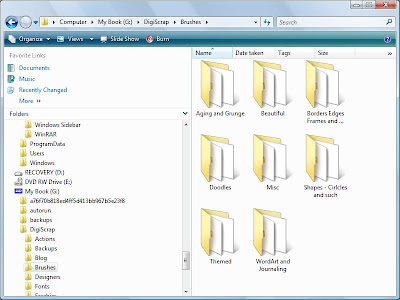 2. Then open up PSE go to Edit >Preset Manager
3. Load the brushes you want to be in your custom .abr file i.e. Folder/Collection
4. Hold down Cntrl Key and click on each one that you want in your new collection
(You will see that the ones selected now have a darker line around each one of them)
5. Now Click on Save set
6. Type in the name you want them to be (Don't use the name of an existing brush set)
7. You will not be able to see the brush set until you restart Elements so close it down and restart it.
This tutorial is based off of the instructions found here
I save all my brushes under Photoshop Elements folder, because I want them to load automatically to see what I have. The problem I found was, even if I organized my brushes into folders, when I went to PSE they were all listed (and not organized into folders...like the default ones). So, I found that if I created my own .abr file with all the brushes located in each folder...I could then have a "organized" brush selection. So here is how I do it:
1. Organize your custom brushes in a folder that is NOT:
C:\Program Files\Adobe\Photoshop Elements 7.0\Presets\Brushes
(I chose to do it on my EHD)
Here is a screen capture of what mine looks like:
 2. Then open up PSE go to Edit >Preset Manager
3. Load the brushes you want to be in your custom .abr file i.e. Folder/Collection
4. Hold down Cntrl Key and click on each one that you want in your new collection
(You will see that the ones selected now have a darker line around each one of them)
5. Now Click on Save set
6. Type in the name you want them to be (Don't use the name of an existing brush set)
7. You will not be able to see the brush set until you restart Elements so close it down and restart it.
This tutorial is based off of the instructions found here
Subscribe to:
Posts (Atom)



 Posts
Posts


